Accessible motion
Reduced-motion versions, flashing limits and keyboard paths for motion-heavy sites, shown on three real 3D and scroll sites with and without motion.
Motion is how a site explains cause and effect, guides the eye and sets its mood. It can also make people dizzy, nauseous or worse. People with vestibular disorders, migraine, epilepsy or attention difficulties are affected by large movement, parallax, zooming and flashing, and many have already told their devices so.
This guide is about keeping motion-heavy sites usable for them: real reduced-motion versions, no dangerous flashing, and keyboard and touch paths through cursor-driven pieces. We show it on our own 3D and scroll-driven concept sites, made by the Laarpi team with the library behind Laarpi's animated websites. Each of them has a reduced-motion version designed alongside the moving one.
The short answer
Four WCAG 2.2 criteria cover most of what motion-heavy sites get wrong:
| Criterion | Level | What it asks |
|---|---|---|
| 2.3.1 Three Flashes or Below Threshold | A | Nothing flashes more than three times in any one second, unless it stays under the size and brightness thresholds. |
| 2.2.2 Pause, Stop, Hide | A | Movement that starts on its own, lasts more than five seconds and runs beside other content can be paused, stopped or hidden. |
| 1.4.2 Audio Control | A | Sound that plays on its own for more than three seconds can be paused or turned down. |
| 2.3.3 Animation from Interactions | AAA | Motion triggered by interaction, such as scroll-driven animation, can be turned off unless it is essential. |
Add 2.1.1 Keyboard (Level A): anything that carries information must work without a pointer.
The tool for 2.3.3 is prefers-reduced-motion, a media feature that reports whether the visitor has asked their system for less motion. Level AAA isn't a legal requirement in most places. But scroll-driven 3D is exactly the motion the setting exists for, and the visitors who turn it on are the ones a motion-heavy site will hurt. We treat it as required.
Design the still version first
The common failure is to treat reduced motion as a switch: wrap the animations in a media query, turn them off, ship. On a scroll-driven site that leaves elements stranded mid-transition, copy that was meant to fade in never appearing, and a 3D scene frozen at its first frame while the text describes things it never shows.
Plan it the other way round. Before any motion is built, write the site as a series of composed frames: what the visitor should see at each beat of the story if nothing moved. Then motion becomes the way you travel between those frames, and the reduced-motion version is the frames themselves. It costs very little extra when it's planned, and a great deal when it's retrofitted.
Side by side: three sites
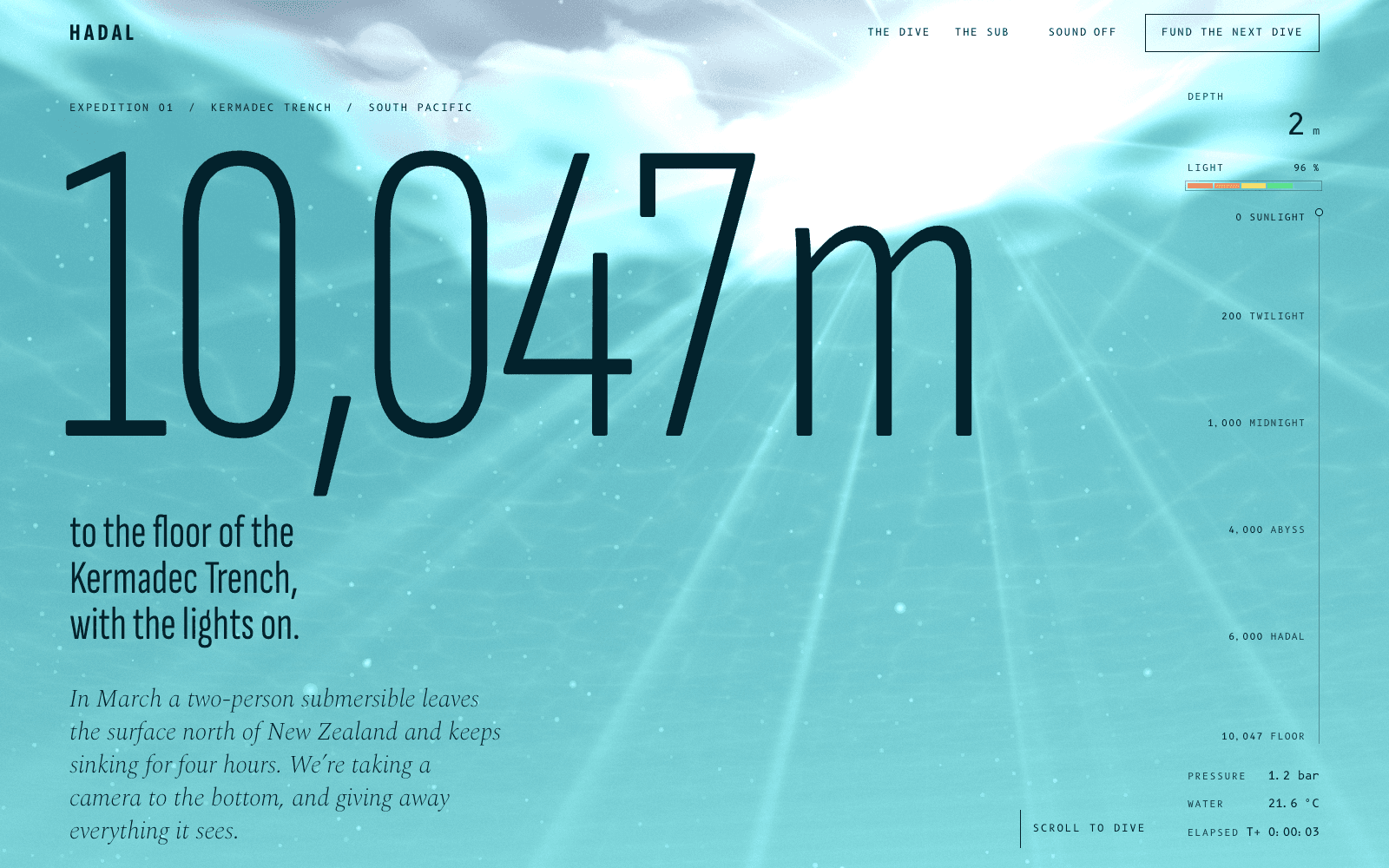
HADAL is a concept site for a deep-sea expedition: scrolling sinks you 10,047 metres while the water takes the light colour by colour. Its write-up covers the build.
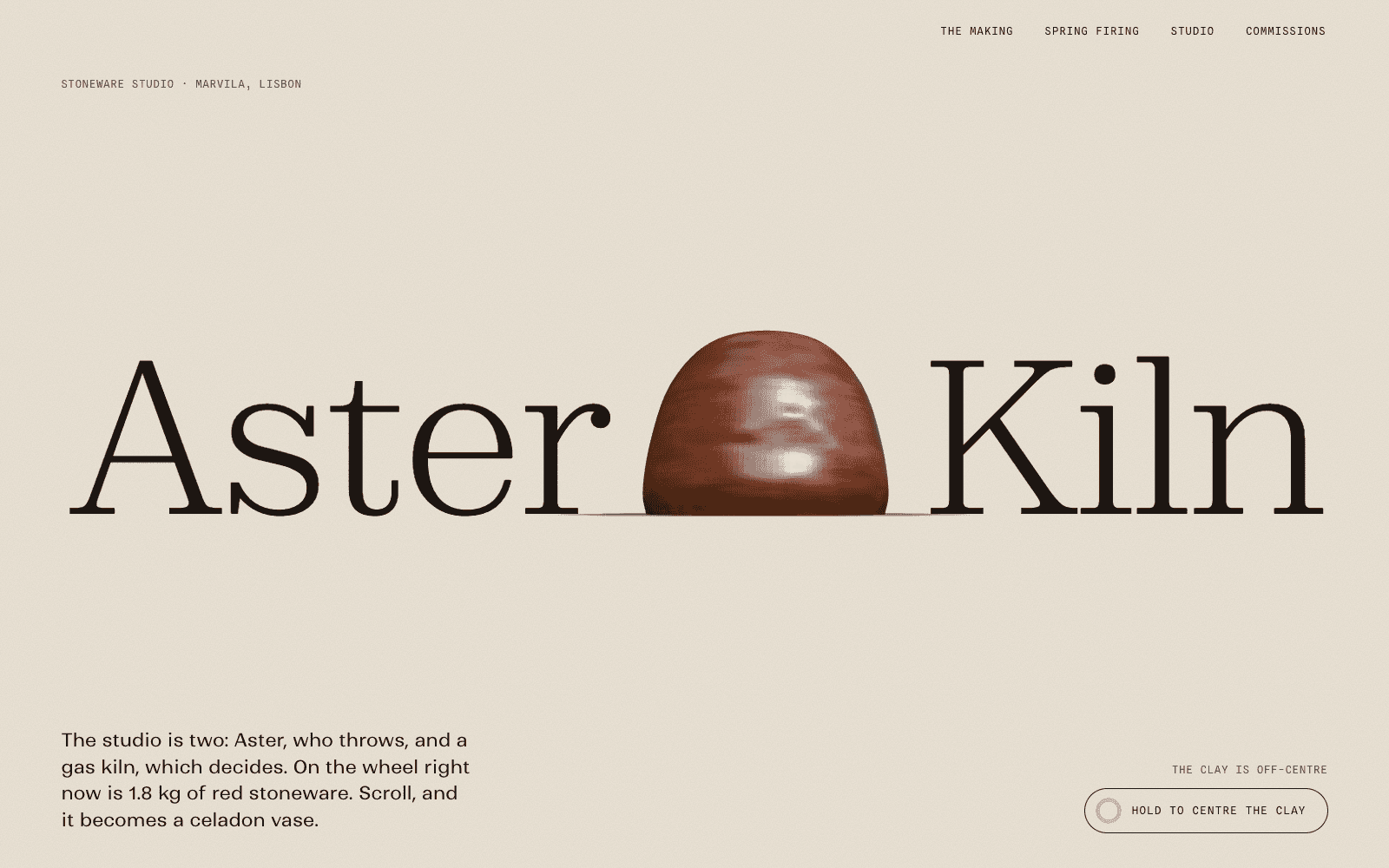
Aster & Kiln is a concept site for a ceramics studio: scrolling throws a stoneware vase, then fires it behind a kiln spyhole. Its write-up covers the build.
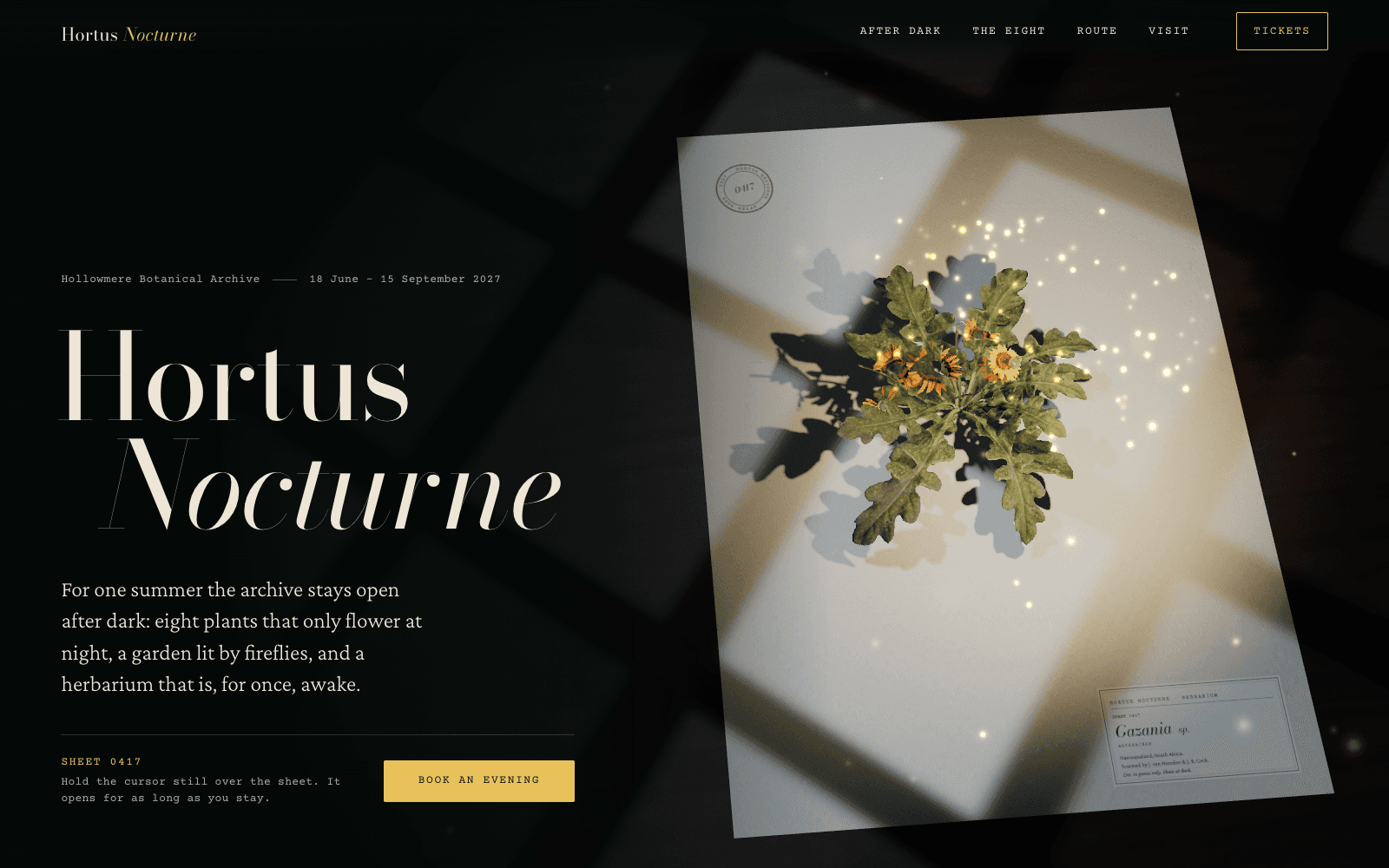
Hortus Nocturne is a concept site for a night garden: a pressed flower stands up and blooms only while you hold the cursor still. Its write-up covers the build.
| With motion | With reduced motion | |
|---|---|---|
| HADAL | Smooth scrolling lowers the camera through the water; text arrives as you descend; marine snow streaks with your speed | Smooth scrolling off, text visible at once, and each depth zone is a composed still that still changes colour with depth, so the story of the light survives |
| Aster & Kiln | One mesh morphs through eight states as you scroll, from a lump of clay to a fired vase | A static catalogue: a section drawing of each step and a still render of every pot |
| Hortus Nocturne | The camera lowers to eye level; the specimen wakes where you hold the cursor; the route draws itself as you scroll | The specimen appears as a composed still, already awake; the flower drawings appear instantly; the route is drawn in full |
The other five follow the same rule. BASALT cuts to a composed still per section with no scroll-driven break. Meridian M-01 shows three still movements and a flat lay of its parts. FLUOR 26 becomes a still print with one baked stroke through the wordmark. PATCH-01 holds a composed state per section, with steady LEDs and settled cables. Salt & Smoke renders each camera station as a finished still, with the fire and smoke frozen at a settled moment.
Code that runs
CSS: motion is the enhancement
Make the still state the default and add motion only when the visitor hasn't asked for less. Gating it on a class set by script also means a failed script never leaves content invisible:
/* Content is visible by default. Motion is added only when the visitor hasn't asked for less,
   and only once the script has run, so a failed script never hides the page. */
@media (prefers-reduced-motion: no-preference) {
  .motion-ok .reveal { opacity: 0; transform: translateY(24px); transition: opacity 0.6s, transform 0.6s; }
  .motion-ok .reveal.is-in { opacity: 1; transform: none; }
}
JavaScript: read the setting, and listen for changes
const motion = matchMedia("(prefers-reduced-motion: reduce)");
const root = document.documentElement;

function applyMotionPreference() {
  root.classList.toggle("motion-ok", !motion.matches);
}
applyMotionPreference();
motion.addEventListener("change", applyMotionPreference); // the setting can change while the page is open

const io = new IntersectionObserver((entries) => {
  for (const e of entries) {
    if (!e.isIntersecting) continue;
    e.target.classList.add("is-in");
    io.unobserve(e.target);
  }
}, { rootMargin: "0px 0px -10% 0px" });
document.querySelectorAll(".reveal").forEach((el) => io.observe(el));
We ran both blocks together in headless Chrome with the setting on and off, and flipped it mid-visit: with reduced motion the headings are visible from the start, without it they fade in on arrival.
Smooth scrolling only when it's welcome
HADAL creates its smooth-scroll instance only when reduced motion is off, and every scroll call falls back to the browser's own:
let lenis = null;
if (!reduced) {
  lenis = new Lenis({ lerp: 0.085, smoothWheel: true, anchors: false });
  lenis.on("scroll", ScrollTrigger.update);
}
const scrollY = () => (lenis ? lenis.animatedScroll : window.scrollY);
A 3D scene that renders one composed frame
With reduced motion, don't start the animation loop at all. Render once, and render again only when the state changes, such as on resize or when the visitor reaches a new section:
if (reduced) draw(0); // one composed still, no loop
else renderer.setAnimationLoop((t) => { if (onScreen && !document.hidden) draw(t); });
Hortus Nocturne goes one step further and asks its stage for a specific still per section, for example the pressed sheet at the close:
// reduced motion: the bookend is simply the pressed sheet
if (reduced) stage.still({ awake: self.isActive ? 0 : 1, gather: self.isActive ? 0.15 : 0.9 });
The full scene skeleton is in how to build a 3D website.
Cursor-driven pieces: keyboard and touch
A cursor effect raises one question: does it carry information, or does it decorate? If it carries information, it needs a keyboard path. If it decorates, everything it reveals must also be in the copy.
- PATCH-01's knobs are slider controls over the 3D render, so they take arrow keys and Page Up and Page Down. The jacks are buttons: Enter or Space picks up a cable and plugs it in, and a live region announces each change to screen readers.
- BASALT's obsidian slab takes focus and turns with the arrow keys, and every track has its own ring button, so the sound works without a pointer.
- HADAL's lamp follows the cursor, or a finger on a phone, below 1,000 m. It has no keyboard equivalent, so every fact the animals illustrate is also written in the page copy. The donation buttons, the sound toggle and "Drop ballast" are ordinary buttons.
- Hortus Nocturne's specimen wakes under a still cursor or a held touch. It decorates, so its ledger rows, which draw each flower, are buttons that respond to keyboard focus as well as pointer and touch.
Touch needs its own design, not an emulated cursor. A phone has no hover, so "hold the cursor still" becomes "touch and hold" on Hortus Nocturne, and the lamp follows the finger on HADAL.
Sound and flashing
On every one of our sites that has sound, nothing plays until the visitor asks: there is a Sound or Power button, off by default. That keeps you clear of 1.4.2, and it's simply good manners on a page people may open in an office or on a train.
For flashing, check the fastest thing on the page. HADAL's Atolla jellyfish fires its alarm as a slow rotating wheel of light rather than a strobe. FLUOR 26's visuals respond to a kick drum, and the fastest act on its lineup is 172 BPM: 2.87 beats a second, under the three-flash limit even if every beat pulsed. Large red flashes are risky at any rate, and none of our sites uses them.
Loaders count too
A 3D site's loader is often the first motion a visitor sees. Ours mark the main content as busy until it is ready, use role="progressbar" with a whole-number value updated a few times a second at most, keep focus untouched, and keep the real copy in the document underneath. With reduced motion they still show progress, as a number or a fill, and the handoff into the page becomes a crossfade of 200 ms or less. 3D website performance explains how they measure progress.
How to test
- Turn the setting on in your own system. macOS: System Settings, Accessibility, Display, Reduce motion. Windows 11: Settings, Accessibility, Visual effects, Animation effects off. iOS: Settings, Accessibility, Motion, Reduce Motion. Android: Remove animations, under Accessibility (the exact menu varies by maker).
- Emulate it in Chrome from the DevTools Rendering panel ("Emulate CSS media feature prefers-reduced-motion"), or set it per page in automated tests. We capture every section of each site at desktop and phone widths with the setting on and off, and compare the frames whenever a site changes.
- Walk the page with a keyboard only. Tab through everything, use Space and Page Down to scroll, and make sure focus is always visible and never hidden behind a 3D layer.
- Try a screen reader on the busy parts: the loader, live regions, and anything announced when it changes.
- Check contrast against the live render, not just against the background colour. Salt & Smoke switches its type to soot when the smoke turns white.
In the EU: the European Accessibility Act
The European Accessibility Act, Directive (EU) 2019/882, has applied since 28 June 2025 to certain products and services offered to consumers in the EU, including e-commerce. In practice, conformance is judged against the harmonised standard EN 301 549, which incorporates WCAG 2.1 Level AA. Microenterprises that provide services, with fewer than 10 staff and no more than €2 million in annual turnover or balance sheet, are exempt from the service requirements. Each member state has its own implementing law and enforcement. This is a summary for orientation, not legal advice.
Even where the Act doesn't apply, the same criteria are what accessibility complaints elsewhere are usually measured against.
Checklist
- Write the still version first: one composed frame per beat of the story.
- Make still the default in CSS and add motion under
prefers-reduced-motion: no-preference. - Listen for the setting changing while the page is open.
- Turn off smooth scrolling and camera flights under reduced motion; render one composed 3D frame per state.
- Nothing flashes more than three times a second; no large red flashes.
- Sound off until the visitor asks.
- Anything that carries information works by keyboard; anything decorative repeats its content in the copy.
- Touch gets its own gestures, not an emulated hover.
- Test with the real setting, a keyboard, a screen reader, and contrast against the live render.